I - Configuring Authentication with NuGet Feed (Registry Authentication)
II - Steps to Add the Private NuGet Feed
When using a private NuGet feed (Azure Artifacts), you need to authenticate in order to install packages. To do this, use the Azure Artifacts Credential Provider.
- GitHub - microsoft/artifacts-credprovider: The Azure Artifacts Credential Provider enables dotnet, NuGet.exe, and MSBuild to interactively acquire credentials for Azure Artifacts feeds.
- The Credential Provider is usually integrated by default in Visual Studio 2019 and later, as well as in recent versions of the dotnet SDK.
- If you need to install it manually, download it from Releases · microsoft/artifacts-credprovider and follow the steps in the documentation.
| Environment | Feed URL |
|---|---|
| Dev | https://pkgs.dev.azure.com/StrongTie/_packaging/HangerSelector-Artifactory-DEV/nuget/v3/index.json |
| Staging | https://pkgs.dev.azure.com/StrongTie/_packaging/HangerSelector-Artifactory-QA/nuget/v3/index.json |
| Production | https://pkgs.dev.azure.com/StrongTie/_packaging/HangerSelector-Artifactory/nuget/v3/index.json |
- Before you can access and install packages from a private NuGet feed, you must first add the feed as a source in your environment. This is typically done using the following command in the Visual Studio PowerShell terminal:
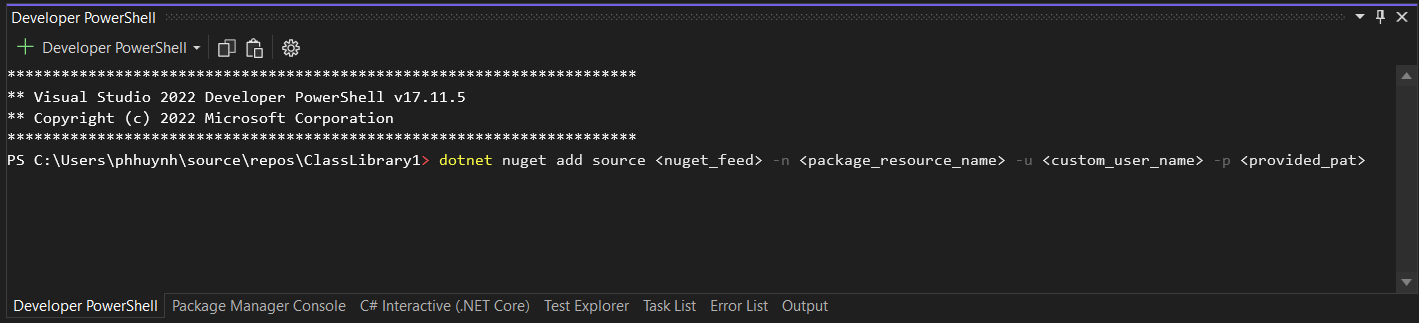
dotnet nuget add source <nuget_feed> -n <package_resource_name> -u <custom_user_name> -p <provided_pat>| Parameter | Description |
|---|---|
<nuget_feed> | The private NuGet feed URL provided to you (this is the Azure Artifacts feed). |
-n <package_resource_name> | The name you assign to this package source. This can be any descriptive name (e.g., "MyCompanyFeed" or "PrivateRepo") that helps you identify the feed in Visual Studio or the dotnet CLI. |
-u <custom_user_name> | The username for authentication. For Azure Artifacts, this can be any value (for example, "azuredevops" or any custom string), as authentication is primarily handled via the personal access token. |
-p <provided_pat> | The Personal Access Token (PAT) provided to you for authentication. This token grants you access to the private feed and should be kept secure. |
- After running this command, the private feed will be available as a package source in your environment, allowing you to install and update packages as needed.